Tag Archives: Hydrography

GIS Hydro 2013 Pre-Conference Water Resources Workshop: More Coming Soon!

by Steve Kopp, Geoprocessing and Spatial Analysis Team, Esri

Jump-start your conference a day early by joining us for the 20th annual pre-conference Water Resources Workshop on Sunday July 7th. The Water Resources Workshop is a FREE, full day workshop focused on emerging trends in the integration of GIS and Water Resources and how you can use them in your work.

Continue reading

Posted in 3D GIS, Analysis & Geoprocessing, ArcGIS Online, Community Maps, Editing, Electric & Gas, Geodata, Hydro, Imagery, Local Government, Mapping, National Government, Oceans & Maritime, Public Safety, Services, State Government, Transportation, Uncategorized, Water Utilities, Web | Tagged , , , , , , , , , , , , , , , , , , | 1 Comment

Hydro Basemap Gone GLOBAL

by Caitlin Scopel, Cartographic Product Engineer, Esri

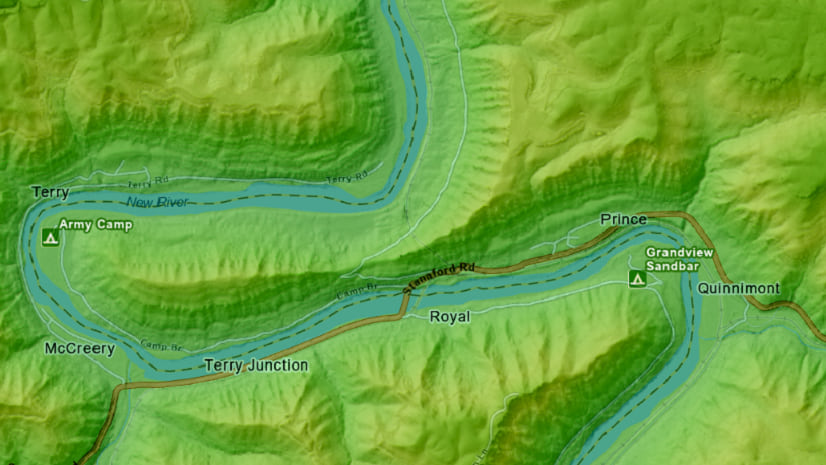
World Hydro BasemapThe Hydro Basemap is now the  WORLD Hydro Basemap.  The World Hydro Basemap uses the same design as its predecessor, but extends the coverage to the World at scales of 1:147 million to 1:2.3 million.  The World Hydro Basemap includes the map tiles from the original Hydro Basemap, providing coverage of the United States down to the 1:18,000 scale.

The World Hydro Basemap is comprised of two map service layers: the World Terrain Base, and the World Hydro Reference Overlay.  The World Terrain Base provides the elevation context necessary to understand why the world’s surface water flows where it does.

The World Hydro Reference Overlay provides the streams, waterbodies, drainage areas, and cultural reference information necessary to make the World Hydro Basemap useful for scientists, professionals and researchers in the fields of Hydrology, Geography, Climate, Soils, and other natural sciences related to water.

Continue reading

Posted in Hydro, Mapping | Tagged , , , , , , , , , , , , , , , , , | 6 Comments

Hydrography Event Management Tool Version 2.5 is Now Available!

A new release of the Hydrography Event Management (HEM) Tool is available for ArcGIS 10. The HEM Tool provides full functionality for adding and editing events in the National Hydrography Dataset (NHD). Events are informational data that are linked to the NHD using a linear referencing on NHDFlowlines. The HEM tool handles all the linear referencing mechanics to make working with events simple. Hydrography events support many applications such as resource management, environmental protection, emergency response, fisheries and much more.

Hydrography event


Hydrography event


Hydrography event


Hydrography event 


Enhancements to Version 2.5 include:

  • Added a Pan button to candidate form.
  • Candidate form can list an additional attribute per event layer. Values from each event layer’s ‘Display  Expression’ field will be listed in the candidate form.
  • Import to Events – before starting batch import the tool will now verify the spatial reference of the data frame and the NHDFlowline feature class are exactly the same.
  • Import to Events will warn the user if they are about to apply approved imported events to a base table with the same name. Users have the option to stop or continue the process.
  • Import to Events can now transfer no fields, just the link field, or all fields. All fields only works for standard field types (string, date, and numeric). Blobs, OIDs, GUIDs and shape type fields will not transfer.
  • Create Multiple Events Downstream – Added new functionality (button) to create multiple downstream events from a point layer in the map. Not default on HEM toolbar, found under Customize > Commands > Categories > HEM > Batch Downstream from Points. Option to create overlapping or non-overlapping events from input points.
  • Import to Events QC and Batch Sync QC will now allow users to select multiple rows at once and approve them all.
  • SourceFeatureID now has an option to enforce unique IDs in event feature classes.

Find out more information and download the tool at: http://nhd.usgs.gov/tools.html.

An online demo of new features will be scheduled for the week of Oct 31st, email hem@usgs.gov to attend.

Special thanks to Ariel Doumbouya for providing this post. Questions for Ariel: hem@usgs.gov.

Posted in Hydro | Tagged , , , , , , , , , , , | Leave a comment

Arc Hydro Tools Version 2.0 Are Now Available!

Esri has released a new version of the Arc Hydro Tools, version 2.0.

This is good news for those of you who have been waiting to upgrade your ArcGIS software until the new Arc Hydro Tools are ready.  In version 2.0, Arc Hydro tools are now fully compatible with ArcGIS version 10.0.

In addition to full compatibility with the software version 10.0, the new version of the Arc Hydro tools are also now fully available in the geoprocessing environment.

A lot of effort has been put into this release into improving performance for preprocessing large datasets.  The new version runs better and faster with larger datasets.

Arc Hydro Tools are free with your ArcGIS software license.  You may download version 2.0 of Arc Hydro Tools here (32MB).

If you also need the tutorial data for both Arc Hydro Tools and Arc Hydro Tools for Geoprocessing, you may download both in a bundle here (146MB).

For past versions of Arc Hydro Tools, please see the Hydro Data Model page at esri.com.  Be sure to keep visiting the Hydro Data Model page for more information about upcoming Arc Hydro training classes and workshops.

Special thanks to Michael Dangermond for providing this post. Questions for Michael: MDangermond@esri.com. 

Posted in Hydro | Tagged , , , , , , , , , | 9 Comments

Versatile New Maps: The Medium Scale Hydro Basemap and Hydro Reference Overlay

In the bad old days, you may have done some work for a client and got to a point where you just want to make a map for a meeting or a report.  One of the most time consuming parts of making a map from scratch was finding data for rivers, streams, and lakes, then turning each an appropriate blue, making each line the appropriate symbol, then symbolizing each stream segment.  It takes time to find a dataset that is good enough, at the right scale, and that looks good when you are done symbolizing everything.  It may take you hours to find the right data, symbolize, and label everything.

In my past life as a consultant, sometimes I had to start from scratch like this. I spent time finding and downloading appropriate scale data, checking it to see if it looks OK on my map, then symbolizing each stream and lake at least a little bit (most places I have worked don’t need glaciers symbolized) so they show up with the right symbol.  Once that is all set, I haven’t even started labeling each stream, which can take quite a while to get right.

Sometimes to save my clients money I would give up and use USGS DRGs, turning only the blue symbols on.  I often thought wouldn’t it be wonderful if there was some kind of national hydrologic map service on the internet that you can just add to your map and it just works?

Now there is… in the form of the esri Mapping Center Hydro Team Hydro Basemap.  We have made a medium scale hydro basemap of the United States, from 1:147,000 to 1:18,000.  And we think it will make a lot of things easier for our community.

The Hydro Basemap of the United States is based on NHD, but with a focus on analytical cartography.  These maps are made to show hydrologic networks connecting through a system.  What’s known as the ‘Hydro Basemap’ is just the Hydro Reference Overlay plus relief… At times you may have your own relief or basemap and may not need any background behind the rivers and lakes.  For that you don’t want the whole Hydro Basemap, just what’s called the Hydro Reference Overlay. That’s the only difference in the two concepts… the presence of relief.  These two products are close companions to one another.

Hydro Basemap

Gardiner, Maine area, esri Mapping Center Team Hydro Basemap of the United States

Actually the Mapping Center Team has gone way beyond the concept I described earlier.  What we actually built is a hydro basemap, but one that is ready for a multiscale experience.  You can take one of the applications we built such as the High Water Map, then recycle/repurpose the javascript application for your needs, and the basemap is ready for you to use.  Just add your data.

 Hydro Basemap mashup with USGS Gauges

A map created on arcgis.com using the hydro basemap, mashed up with the USGS river gauge service.

As you zoom in and out, streams turn on and off, and labels rearrange for you.  As you zoom in, more and more stream segments appear that are important to your map view.  As you zoom out, smaller streams that would clutter your map view are selected out of the cache and removed.  Streams do not turn off and on indiscriminately or based solely on size or flow, there is a sophisticated algorithm at work here that will prioritize small streams with big important names (such as the upper Mississippi River in Minnesota).  In addition, different parts of the country have different methods of stream prioritization, and these are respected.  There is no one size fits all method to pruning streams as scales change, since different parts of the country have different soils and drainage characteristics. Don’t worry, we have done this for you so you don’t have to.

It’s easy to get used to something like this because (as we like to think at the Mapping Center) it’s how things should have been all along. We at the Mapping Center Hydro Team are proud of this product and would like you to give it a spin, and see how you like it.  We’d like to hear your comment to know how easy this is for you to use.  I wish they had this when I was a consultant.

Special thanks to Michael Dangermond for providing this post. Questions for Michael:  mdangermond@esri.com

Posted in Hydro | Tagged , , , , , , , , , , , , , , , , , , , | 2 Comments

Newly Available! Arc Hydro Groundwater 3.0 with Supporting Tutorials

Arc Hydro Groundwater version 3.0 is now available for download from Aquaveo Image

Version 3.0 offers new tools (as well as the regular improvements and bug fixes) such as

  • Create Unique ID Table and Assign HydroID GW—these tools create and assign unique identifiers in an Arc Hydro Groundwater geodatabase.
  • BoreholeLog to Points—use this tool with your BoreholeLog table to derive 3D points which are used to interpolate rasters and generate GeoSection or GeoVolume features.

Borehole data to GeoRasters


For a full
list of new features

available in Arc Hydro Groundwater Version 3.0 check the Arc Hydro Groundwater Wiki.

Additionally, new tutorials are available in the Arc Hydro Groundwater Learning Center, including:


We hope you find the new tools and tutorials useful.

*For more information on Arc Hydro Groundwater check out the Hydro Resource Center’s
Groundwater page
.


Special
thanks to Gil Strassberg for providing the post. Questions for Gil:
gstrassberg@aquaveo.com

Posted in Hydro | Tagged , , , | Leave a comment

Hydrography Event Management Tool for ArcGIS 10

  
National Hydrography Dataset


The Hydrography Event Management (HEM) Tool Version 2.4 for ArcGIS 10 is now available!

The HEM Tool provides full functionality for adding and editing events in the National Hydrography Dataset (NHD).

Events are informational data linked to the NHD using a linear
referencing system on NHDFlowlines.  The use of events allows vast
amounts of scientific information to be linked to the NHD.

The HEM tool handles all linear referencing mechanics to make working with events easy.  It works on point, line, and area events and allows events to be located interactively, imported, or calculated.

A number of state and federal partners have adopted HEM: Environmental Protection Agency (EPA) incorporated HEM to meet Clean Water Act reporting requirements, the U.S. Forest Service incorporated HEM functionality into their National Resource Information System (NRIS) Aquatic Surveys application, Bureau of Land Management (BLM) incorporated HEM to support event creation for its Oregon/Washington Aquatic Resource Information Management System
and is evaluating its use for a national Riparian Database, and the HEM
Tool is used to georeference water quality data to the NHD, and this
information is then used for Section 303(d) water quality reports on impaired waters.

The
HEM effort is a unique collaboration between the BLM, U.S. Geological
Survey (USGS), and the EPA that results in ongoing tool development and
support to the expanding HEM user community.

The USGS provides basic to advanced HEM training with easy to follow exercises:

and additional user support in the Troubleshooting Guide.

OR you can request training and support on a specific HEM topic.

To find out more information visit USGS’s HEM site.

NHD Tools


Special thanks to Ariel Bates for providing the post. Questions for Ariel: atbates@usgs.gov

Posted in Hydro | Tagged , , , , , , , , | 2 Comments